> ## Documentation Index
> Fetch the complete documentation index at: https://docs.snackbase.dev/llms.txt
> Use this file to discover all available pages before exploring further.

# SnackBase

>  

<div className="not-prose my-12">
  <div className="flex flex-col items-center text-center py-12 px-4">
    <h1 className="text-5xl md:text-7xl font-bold mb-6 tracking-tight">
      Build like a Startup.
      <span className="block bg-gradient-to-r from-green-500 to-emerald-600 bg-clip-text text-transparent">Comply like an Enterprise.</span>
    </h1>

    <p className="text-xl md:text-2xl text-gray-600 dark:text-gray-300 max-w-3xl mb-10 leading-relaxed">
      The open-source Python backend with immutable audit logs, GxP compliance, and row-level security built-in.
    </p>

    <div className="flex flex-col sm:flex-row gap-4 mb-16">
      <a href="https://demo.snackbase.dev" target="_blank" rel="noopener noreferrer" className="inline-flex items-center justify-center gap-2 px-8 py-4 bg-green-600 hover:bg-green-700 text-white font-semibold rounded-lg transition-all duration-200 shadow-lg shadow-green-600/25 hover:shadow-green-600/40">
        <svg xmlns="http://www.w3.org/2000/svg" width="20" height="20" viewBox="0 0 24 24" fill="none" stroke="currentColor" stroke-width="2" stroke-linecap="round" stroke-linejoin="round">
          <polygon points="5 3 19 12 5 21 5 3" />
        </svg>

        Launch Demo
      </a>

      <a href="/quickstart" className="inline-flex items-center justify-center gap-2 px-8 py-4 bg-white dark:bg-gray-800 border-2 border-gray-200 dark:border-gray-700 hover:border-green-500 dark:hover:border-green-500 text-gray-900 dark:text-white font-semibold rounded-lg transition-all duration-200">
        <svg xmlns="http://www.w3.org/2000/svg" width="20" height="20" viewBox="0 0 24 24" fill="none" stroke="currentColor" stroke-width="2" stroke-linecap="round" stroke-linejoin="round">
          <path d="M14.5 2H6a2 2 0 0 0-2 2v16a2 2 0 0 0 2 2h12a2 2 0 0 0 2-2V7.5L14.5 2z" />

          <polyline points="14 2 14 8 20 8" />
        </svg>

        Get Started
      </a>
    </div>

    <div className="flex items-center gap-8 text-sm text-gray-500 dark:text-gray-400">
      <div className="flex items-center gap-2">
        <svg xmlns="http://www.w3.org/2000/svg" width="18" height="18" viewBox="0 0 24 24" fill="none" stroke="currentColor" stroke-width="2" stroke-linecap="round" stroke-linejoin="round">
          <path d="M22 11.08V12a10 10 0 1 1-5.93-9.14" />

          <polyline points="22 4 12 14.01 9 11.01" />
        </svg>

        No credit card required
      </div>

      <div className="flex items-center gap-2">
        <svg xmlns="http://www.w3.org/2000/svg" width="18" height="18" viewBox="0 0 24 24" fill="none" stroke="currentColor" stroke-width="2" stroke-linecap="round" stroke-linejoin="round">
          <circle cx="12" cy="12" r="10" />

          <polyline points="12 6 12 12 16 14" />
        </svg>

        Setup in 5 minutes
      </div>
    </div>
  </div>
</div>

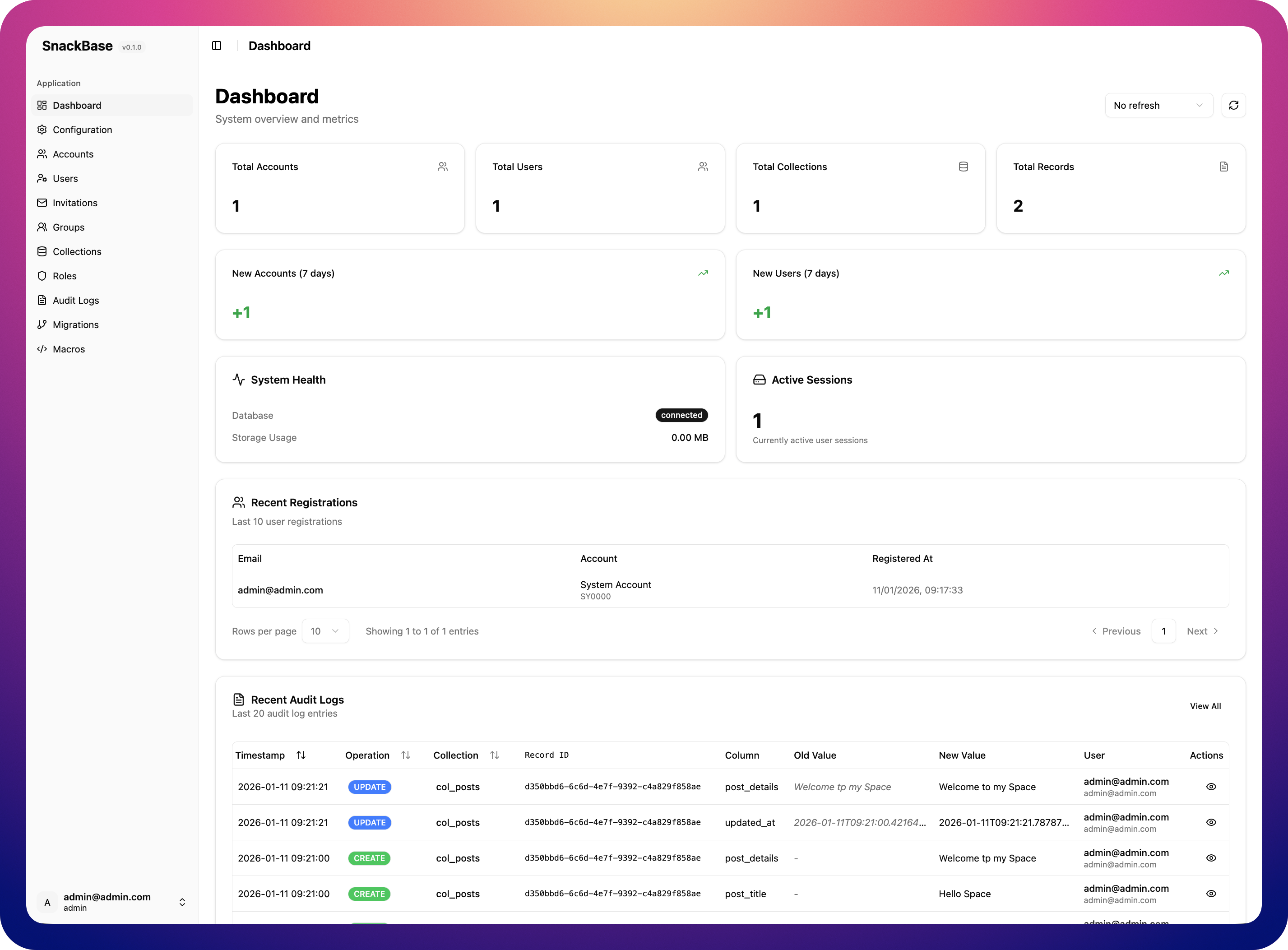
<Frame caption="The SnackBase Admin UI: Multi-tenancy and Audit Logs out of the box">
  <img src="https://mintcdn.com/lg-15da013d/XnZCQ4tmWKxmWWJD/images/admin-dashboard.png?fit=max&auto=format&n=XnZCQ4tmWKxmWWJD&q=85&s=beb0993ddaf48871c4e971294a0715ad" alt="SnackBase Admin Interface" className="rounded-lg shadow-2xl border border-gray-800" width="2854" height="2105" data-path="images/admin-dashboard.png" />
</Frame>

***

## Why SnackBase?

<Columns cols={3}>
  <Card title="Instant APIs" icon="zap">
    Define your data schema and get fully functional CRUD REST APIs instantly. No boilerplate, no manual endpoint creation.
  </Card>

  {" "}

  <Card title="Multi-Tenancy" icon="users">
    Built-in support for multiple accounts/organizations with complete data
    isolation. Perfect for SaaS applications.
  </Card>

  <Card title="Enterprise Security" icon="lock">
    SQL-native row-level security (RLS), field-level access, single-tenant mode, OAuth, SAML, and audit logs.
  </Card>
</Columns>

***

## Everything You Need to Ship Fast

SnackBase provides a complete backend foundation so you can focus on building your product.

<Columns cols={3}>
  <Card title="Collections & Schemas" icon="database">
    Define your data models with a simple schema syntax. Get validation, types, and auto-generated APIs.
  </Card>

  {" "}

  <Card title="Permissions Engine" icon="shield-check">
    Fine-grained access control at the collection, record, or field level. Write
    rules, not boilerplate.
  </Card>

  {" "}

  <Card title="Authentication" icon="key">
    Built-in OAuth (Google, GitHub, Microsoft, Apple) and SAML support. Or bring
    your own auth provider.
  </Card>

  <Card title="Automation Engine" icon="bolt">
    Webhooks, scheduled hooks, multi-step workflows, and custom endpoints -- all configurable via API without writing backend code.
  </Card>

  {" "}

  <Card title="Extensible" icon="code">
    Write custom hooks, macros, and business logic in Python. Extend everything.
  </Card>

  {" "}

  <Card title="Background Jobs" icon="clock">
    Reliable async job execution with automatic retries, priority queues, and built-in monitoring.
  </Card>
</Columns>

***

## Quick Start in 3 Steps

<Steps>
  <Step title="Install SnackBase">
    Install SnackBase locally or deploy to your cloud in seconds.
  </Step>

  <Step title="Define Your Data">
    Create collections and define your schema using our intuitive syntax.
  </Step>

  <Step title="Start Building">
    Use the auto-generated REST APIs or React Admin UI immediately.
  </Step>
</Steps>

<div className="my-8 text-center">
  <a href="/quickstart" className="inline-flex items-center gap-2 px-6 py-3 bg-green-600 hover:bg-green-700 text-white font-semibold rounded-lg transition-all duration-200">
    Read the Quick Start Guide

    <svg xmlns="http://www.w3.org/2000/svg" width="16" height="16" viewBox="0 0 24 24" fill="none" stroke="currentColor" stroke-width="2" stroke-linecap="round" stroke-linejoin="round">
      <line x1="5" y1="12" x2="19" y2="12" />

      <polyline points="12 5 19 12 12 19" />
    </svg>
  </a>
</div>

***

## Developer Resources

<Columns cols={2}>
  <Card title="API Reference" description="Complete REST API documentation" icon="terminal" href="/api-reference/introduction" />

  <Card title="Concepts" description="Learn core SnackBase concepts" icon="book-open" href="/concepts/multi-tenancy" />

  <Card title="OAuth Setup" description="Configure OAuth providers" icon="key" href="/guides/oauth-overview" />

  <Card title="Deployment Guide" description="Deploy to production" icon="server" href="/deployment" />
</Columns>

***

<Frame>
  <div className="text-center py-12">
    <h2 className="text-3xl md:text-4xl font-bold mb-4">
      Start Building Today
    </h2>

    <p className="text-lg text-gray-600 dark:text-gray-300 mb-8 max-w-2xl mx-auto">
      Start building compliant apps today
    </p>

    <div className="flex flex-col sm:flex-row gap-4 justify-center">
      <a href="https://demo.snackbase.dev" target="_blank" rel="noopener noreferrer" className="inline-flex items-center gap-2 px-8 py-4 bg-green-600 hover:bg-green-700 text-white font-semibold rounded-lg transition-all duration-200 shadow-lg">
        <svg xmlns="http://www.w3.org/2000/svg" width="20" height="20" viewBox="0 0 24 24" fill="none" stroke="currentColor" stroke-width="2" stroke-linecap="round" stroke-linejoin="round">
          <polygon points="5 3 19 12 5 21 5 3" />
        </svg>

        Launch Demo
      </a>

      <a href="/quickstart" className="inline-flex items-center gap-2 px-8 py-4 bg-white dark:bg-gray-800 border-2 border-gray-200 dark:border-gray-700 hover:border-green-500 text-gray-900 dark:text-white font-semibold rounded-lg transition-all duration-200">
        Read Documentation

        <svg xmlns="http://www.w3.org/2000/svg" width="20" height="20" viewBox="0 0 24 24" fill="none" stroke="currentColor" stroke-width="2" stroke-linecap="round" stroke-linejoin="round">
          <line x1="5" y1="12" x2="19" y2="12" />

          <polyline points="12 5 19 12 12 19" />
        </svg>
      </a>
    </div>
  </div>
</Frame>
